



I’ve tested dozens of invoicing software for freelancers over the past few months, from bare-bones billing tools to full client portals. Here are 8 that cut down on admin time, speed up payments, and make your business look more professional in 2026.
8 Best invoicing software for freelancers: At a glance
Invoicing platforms vary from basic billing tools to complete client management systems with payment automation and branded portals. These tools typically charge payment processing fees when clients pay online, though some platforms add their own fees on top of standard gateway rates.
Let’s compare them side by side:
| Tool | Best for | Annual price | Processing fees | Key strength |
|---|---|---|---|---|
| Assembly | Recurring client work and retainers | $29/month | Card 2.9% + $0.30; ACH 1% (cap $10). +0.3%–0.5% platform fee (plan-dependent) | Contracts and invoicing in one branded client portal, plus a Storefront feature for selling service packages |
| Wave | Budget-conscious freelancers | Free, then starts at $190/year | Card 2.9% + $0.60 (Amex higher); ACH 1%. Pro plan offers discounted rates | Unlimited invoices and accounting features at no monthly cost |
| FreshBooks | Accounting and invoicing in one place | $248.40/year | Card 2.9% + $0.30; ACH 1% | Connects invoicing, time tracking, and expenses in a single accounting dashboard |
| Bonsai | Proposals and contracts in one place | $9/user/month | Card 2.9% + $0.30; ACH 1% (min $1) | Invoices with basic automation, plus templates for proposals and contracts |
| Harvest | Time-based billing and invoicing | Free, then starts at $9/seat/month | No added platform fee; you pay your gateway’s rate (Stripe or PayPal) | Connects time tracking directly to invoice generation |
| HoneyBook | Project-based creative work | $29/month | Card 2.9% + $0.25; ACH 1.5% | Automates client workflows from inquiry to final payment |
| Square Invoices | Billing on-site | Free, then starts at $49/month per location, billed monthly | Card 3.3% + $0.30 (Free plan) / 2.9% + $0.30 (Plus plan) | Mobile-friendly invoicing that integrates with Square’s payment ecosystem |
| Invoice Ninja | Open-source customization | Free, then starts at $140/year | No added platform fee; you pay your gateway’s rate (varies by processor) | Open-source invoicing platform with extensive customization options |
Note: All platforms charge payment processing fees when clients pay online. We’ll discuss the fees below when applicable.
1. Assembly: Best for recurring client work and retainers
- What it does: Assembly is a client portal software tool with built-in invoicing, contracts, and a storefront for selling packaged services. Your clients get one branded workspace to browse your services, sign agreements, and manage payments.
- Who it's for: Freelancers managing retainers or recurring client relationships who want their billing connected to the full client experience.
We built Assembly as a CRM and client portal tool that freelancers can grow with as their client base expands. The platform includes client records and apps for tasks, files, forms, and messaging.
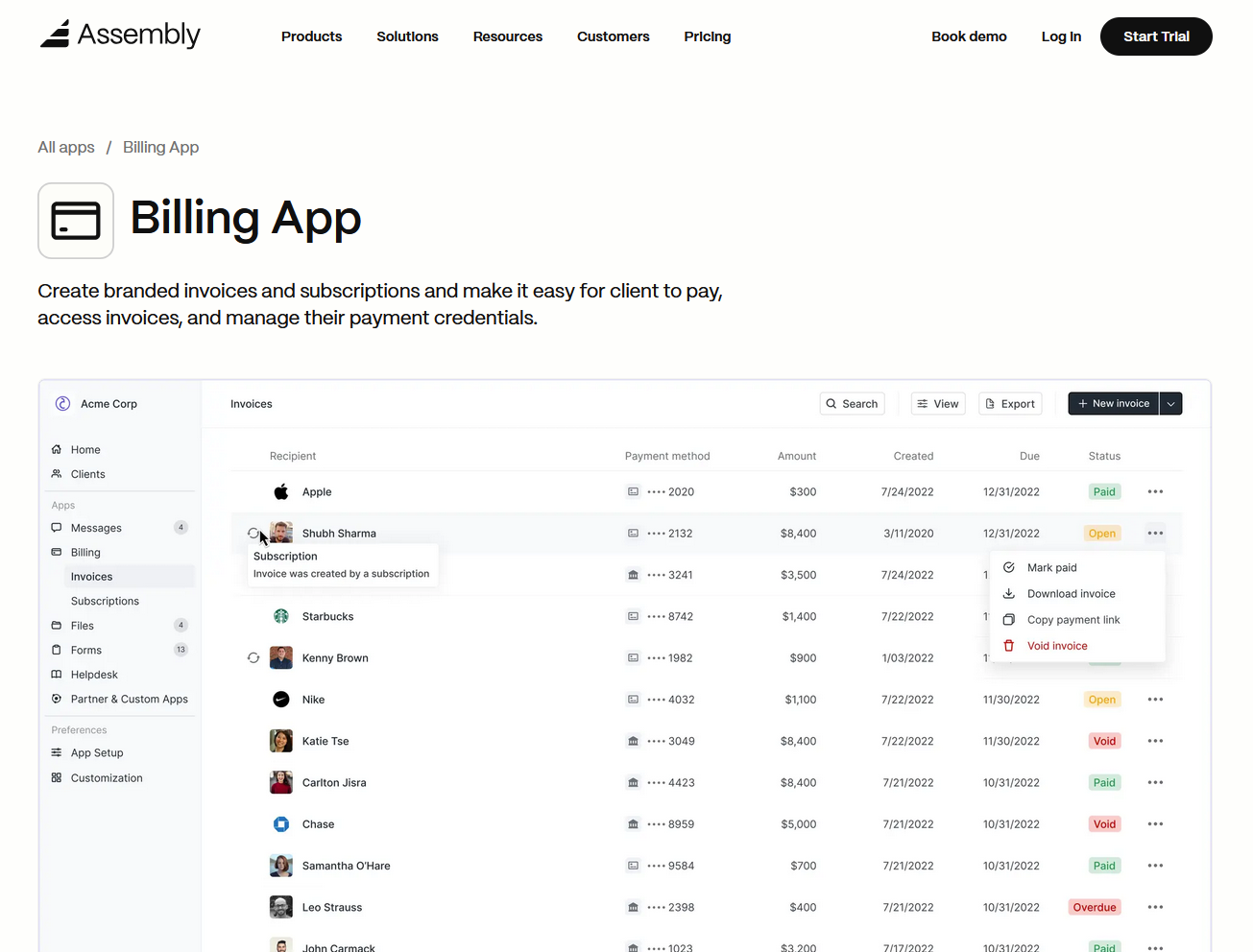
The Billing App is particularly helpful for freelancer invoicing since it handles subscription pricing, one-time invoices, and retainer arrangements. Payment requests link to the client's record, so you can track outstanding invoices alongside communication history and shared files.
Storefronts let you create service packages that clients can browse and purchase directly. When they select a service, the contract and billing are set up in one flow, rather than requiring separate conversations about scope and payment terms. Clients see what they're committing to before billing starts.
Our AI Assistant surfaces recent payment activity and contract details before client calls. You walk into conversations with billing context already available, which cuts down on the time spent answering payment questions or tracking down contract terms.
The App Store includes apps for tasks, files, forms, and messaging that work alongside billing to support ongoing client relationships. Assembly integrates with Airtable, Calendly, ClickUp, Zapier, and Make to connect invoicing with your workflows.
Key features
- Service storefront: Clients browse service packages, compare options, and purchase with contracts in one workspace.
- Billing and contracts: E-signatures, recurring payments, and subscription management connect to client records.
- AI Assistant: Surfaces client payment history and contract status before meetings.
- Client portal: Branded workspace where invoices, files, and communication stay organized.
- Integrations: Connects with ClickUp, Airtable, Calendly, Zapier, and Make for workflow automation.
Pros
- Branded client experience that keeps all billing in one professional space.
- Reduces tool overload by combining invoices with contracts and communication.
- Integrates with ClickUp, Airtable, Calendly, and automation tools.
Cons
- Pricing reflects the full client management platform, not just invoicing features.
- Better suited for ongoing client relationships than one-time projects.
Pricing
Assembly has a free plan, and paid plans start at $29 per month billed annually, with payment processing fees of 2.9% + $0.30 per credit card transaction and 1% per ACH transaction (capped at $10). Assembly also charges platform fees between 0.3% and 0.5% on top of payment processing, depending on your plan tier. These cover invoice payments, subscription billing, and store transactions.
Bottom line
Assembly fits freelancers who want invoicing inside a CRM and client portal rather than as a standalone billing tool. If you're just starting out and only need basic invoicing, platforms like Wave might be a better fit.
2. Wave: Best for budget-conscious freelancers
- What it does: Wave provides unlimited invoicing and accounting features at no monthly subscription cost. It combines bookkeeping, expense tracking, and client billing in one platform.
- Who it's for: Freelancers who need professional invoicing without paying monthly fees.
One thing I’ve noticed about Wave is that the free plan includes everything most freelancers need. I created invoices, tracked expenses, connected bank accounts, and reviewed profit and loss reports without hitting any feature walls or invoice limits.
Wave's free Starter plan covers unlimited invoicing, estimates, bills, and bookkeeping records, although there are transaction fees. The mobile app lets you invoice on the go, and the dashboard brings cash flow and customer data together in one place.
The platform works well for straightforward invoicing and basic accounting. It doesn't include project management or client collaboration tools, so it fits freelancers who just need clean billing paired with simple bookkeeping.
Key features
- Unlimited invoicing: Send as many invoices as needed to unlimited clients with no monthly subscription cost.
- Accounting features: Track income, expenses, and generate financial reports.
- Bank connections: Link accounts for automatic transaction imports.
Pros
- No monthly fees for core invoicing and accounting features.
- Clean interface that's easy to navigate.
- Solid financial reporting for tax preparation.
Cons
- Limited automation on the free plan.
- No built-in project management or time tracking.
Pricing
Wave is free for unlimited invoicing, with payment processing fees of 2.9% + $0.60 per credit card transaction (3.4% + $0.60 for Amex) and 1% for ACH transfers. The Pro plan costs $190/year and includes discounted processing fees and additional workflow features.
Bottom line
Wave removes the barrier of monthly subscription costs while still providing professional invoicing and core accounting features. If you need time tracking built directly into your invoicing workflow, Harvest might suit you better.
3. FreshBooks: Best for accounting and invoicing in one place
- What it does: FreshBooks combines accounting and invoicing with client-facing billing tools in one platform. It’s built to help service businesses set up billing while tracking time and expenses.
- Who it's for: Accounting teams, consultants, and freelancers managing both client billing and financial tracking.
FreshBooks connects accounting directly to invoicing, which helps when new clients need quotes accepted and payment details finalized during setup. I tested the workflow by sending an estimate, converting it into an invoice, and tracking payments in the same dashboard.
It works as a lightweight invoicing tool for firms that want to tie financial setup directly to client billing. The interface is clean and quick to learn, though it's not built for collaboration beyond billing. If you need client portals or project management features, you'll hit the platform's limits quickly.
I’ve seen teams appreciate how it simplifies billing setup when finances are a key part of the client relationship.
Key features
- Client billing area: Lets clients view estimates, invoices, and payments in one place.
- Expense tracking: Records and categorizes business expenses with time logs.
- Automated recurring invoices: Set up automatic billing for repeat clients.
Pros
- Combines billing and accounting in one tool.
- Clear visibility into client payment history.
- Familiar, accountant-friendly interface.
Cons
- Limited communication and file-sharing tools.
- Not built for broader client collaboration.
Pricing
FreshBooks starts at $248.40 per year. Payment processing fees are 2.9% + $0.30 per standard credit card transaction and 1% per ACH transfer.
Bottom line
FreshBooks treats invoicing as part of your accounting system rather than a separate billing tool, which saves time when you need client payments tied directly to expense tracking and financial reports. If you need client collaboration features, Assembly focuses more heavily on client-facing communication and coordination.
4. Bonsai: Best for proposals and contracts in one place
- What it does: Bonsai is a business management platform that combines proposals, contracts, invoicing, and light automation in one workspace. It helps freelancers and small agencies organize early client setup from the first proposal to the first invoice.
- Who it's for: Independent contractors and small teams who want simple tools to manage proposals, contracts, billing, and basic workflow tracking.
Bonsai connects proposals, contracts, and invoices in a single workspace, from proposal through payment. I built a basic workflow that linked proposal templates to contracts and invoices in a few minutes. The setup was straightforward, and the built-in reminders triggered based on the project timeline once work began.
Smaller teams will likely appreciate that Bonsai includes ready-to-use templates for proposals and contracts. I noticed its customization options were limited. You can adjust branding and fields, but multi-user permissions are minimal, which can become limiting as teams grow.
Overall, it’s a strong entry point for agencies formalizing their proposal, contract, and billing process for the first time.
Key features
- Prebuilt templates: Ready-to-use formats for proposals, contracts, and invoices.
- Automated reminders: Scheduled notifications for payments and project deadlines.
- Client tracking: Tracks client status and progress through proposals, contracts, and invoices.
Pros
- Fast setup with minimal learning curve.
- Built-in templates for proposals and contracts.
- Affordable pricing for freelancers and new agencies.
Cons
- Limited customization for branding and workflows.
- Costs can add up with extra team members.
Pricing
Bonsai starts at $9 per user per month, which includes unlimited clients and projects. Payment processing fees are 2.9% + $0.30 per standard credit card transaction and 1% per ACH transfer (with a $1 minimum).
Bottom line
Bonsai connects proposals, contracts, and invoices in one workflow, which reduces the admin work of moving clients from inquiry to payment. If you need more structured client collaboration after the contract is signed, HoneyBook might be a better choice.
5. Harvest: Best for time-based billing and invoicing
- What it does: Harvest connects time tracking directly to invoice generation. It helps freelancers and agencies bill clients based on tracked hours and project time.
- Who it's for: Freelancers and consultants who bill by the hour and need accurate time tracking tied to invoicing.
Harvest focuses on converting tracked time into invoices, which I tested by logging hours across different projects and clients. The time entries flowed into invoice line items with descriptions, hourly rates, and totals. I didn't need to manually calculate or transfer data between systems.
The platform shows you exactly how much time you're spending on different clients and projects through clear reporting. This helps you see how much time different clients and projects require, and where hours tend to add up faster than expected.
Harvest’s free plan includes one seat, two projects, time tracking, basic reporting, and invoicing, which covers the basics for solo freelancers testing time-based billing. It integrates with Stripe and PayPal for payment processing but doesn't charge its own fees on top of standard gateway rates.
Key features
- Time tracking: Records billable hours with project and client tags.
- Invoice creation from time entries: Turns tracked time into invoice line items.
- Reporting: Shows time allocation across clients, projects, and team members.
Pros
- Tight integration between time tracking and invoicing.
- Clean interface with straightforward time entry.
- No additional fees beyond payment gateway rates.
Cons
- Limited features for flat-rate or milestone-based billing.
- Basic project management compared to specialized tools.
Pricing
Harvest starts at $9 per seat per month. Payment processing fees depend on your chosen gateway, typically 2.9% + 30¢ via Stripe or PayPal, with no additional Harvest fees.
Bottom line
Harvest reduces the manual work of calculating billable hours and transferring them to invoices, which saves time for anyone billing by the hour. If you need client portals where clients can view invoices alongside contracts and files, Assembly might be a better option.
6. HoneyBook: Best for project-based creative work
- What it does: HoneyBook helps small businesses manage proposals, contracts, payments, and client communication in one platform. It supports booking and early client setup from the first inquiry through invoicing.
- Who it's for: Creative professionals, event planners, and small agencies handling a steady flow of client projects.
HoneyBook supports client setup using templates and guided workflows. I built a client flow using templates for proposals, contracts, and automated reminders tied to project milestones. The workflows sent invoices and welcome messages based on the project milestones I set, helping to keep communication consistent.
The client-facing portal was clear and easy to navigate, though customization beyond templates is limited. I found that setup takes only a few minutes, which helps small creative teams focus on projects instead of admin.
Key features
- Workflow automation: Sends contracts and invoices based on project milestones.
- Client-facing portal: Lets clients view updates, files, and payment statuses.
- Built-in scheduling: Helps coordinate meetings and reminders in one place.
Pros
- Great for creatives who manage client projects across proposals, contracts, and payments.
- Easy to automate client welcome sequences.
- Affordable entry-level pricing.
Cons
- Limited customization beyond templates.
- Reporting features are minimal.
Pricing
HoneyBook offers a 30-day free trial and starts at $29 per month. Its payment processing fees are 2.9% + 25¢ for card payments and 1.5% for ACH transfers.
Bottom line
HoneyBook helps creative professionals manage project-based client work with minimal setup. This can save time if you’re managing multiple projects. If you need invoicing tied to detailed time tracking for hourly work, Harvest might be a better fit.
7. Square Invoices: Best for billing on-site
- What it does: Square Invoices is a mobile-friendly invoicing tool that works within Square's payment ecosystem. It lets you send invoices, accept payments, and track transactions from your phone or computer.
- Who it's for: Local service providers, contractors, and freelancers who bill clients on location or need mobile invoicing.
I used the mobile app to check how Square Invoices handles on-the-go billing, and the workflow felt designed for people working in the field. I created an invoice, sent it to a test client, and tracked the payment status from my phone within a few minutes. The interface is clean and requires minimal taps to complete common tasks.
Square's strength is the integration with its full payment ecosystem. If you already use Square for in-person payments, your invoices sync with your existing transaction history inside the same account. The Free plan charges higher online processing fees (3.3% + 30¢), while the Plus plan at $49/month reduces those to 2.9% + 30¢.
Square fits service providers who move between job sites or need to invoice immediately after completing work. It's less suited for agencies managing complex client relationships or detailed project tracking.
Key features
- Mobile invoicing: Send and track invoices directly from your smartphone.
- Payment ecosystem: Keeps invoices connected to Square’s point-of-sale and payment processing.
- Payment reminders: Send scheduled payment reminders to clients.
Pros
- Fast mobile experience for on-location billing.
- Integrates seamlessly with Square hardware and payments.
- Free plan available with pay-per-transaction pricing.
Cons
- Higher processing fees on the Free plan compared to competitors.
- Limited features for client collaboration or project management.
Pricing
Square Invoices starts at $49 per month, billed monthly. Online invoice processing starts at 2.9% + 30¢ per transaction. A Free plan is available with higher processing fees of 3.3% + 30¢ for online invoices.
Bottom line
Square Invoices excels at mobile billing for service providers who need to invoice clients immediately after completing work on location. If you need proposals and contracts alongside invoicing for client projects, Bonsai might be a better fit.
8. Invoice Ninja: Best for open-source customization
- What it does: Invoice Ninja is an open-source invoicing platform that offers extensive customization options. It lets you modify templates, workflows, and branding to match your specific needs.
- Who it's for: Freelancers and agencies who want control over their invoicing system and don't mind technical configuration.
I thought the setup for Invoice Ninja would be more complex given its open-source nature, but the hosted version made invoicing pretty straightforward. The real value shows up when you want to customize beyond standard templates. I adjusted invoice designs, modified workflow rules, and connected to different payment gateways without hitting artificial restrictions.
The free plan supports up to 5 clients with unlimited invoicing. Invoice Ninja doesn't add its own fees on top of payment processing, so you only pay whatever your chosen gateway charges. The interface offers more options than simpler tools, which means some clicking around to find specific settings.
Invoice Ninja fits freelancers who want flexibility and don't mind spending time configuring their invoicing system exactly how they want it.
Key features
- Open-source platform: Full access to customize code, templates, and workflows.
- Multiple payment gateways: Works with 40+ payment processors.
- White-label options: Lets you remove Invoice Ninja branding on paid plans.
Pros
- Extensive customization for branding and workflows.
- Free plan supports up to 5 clients.
- No platform fees beyond payment gateway charges.
Cons
- More configuration options mean a steeper learning curve.
- Interface can feel technical compared to simpler tools.
Pricing
Paid plans start at $140 per year for unlimited clients. Payment processing fees depend on your chosen gateway (for example, Stripe or PayPal), with no additional Invoice Ninja fees.
Bottom line
Invoice Ninja gives you a high level of control over your invoicing system through customization and open-source flexibility. If you prefer a simpler interface with less configuration and still want free invoicing, Wave offers unlimited invoicing with built-in accounting features.
How I tested the best invoice software for freelancers
I spent several weeks setting up accounts, creating test invoices, and processing payments through each platform to see how they handle the full billing cycle. My goal was to find which tools actually save time for freelancers and which ones add unnecessary complexity.
I approached every platform like a freelancer managing multiple clients with different payment needs. This meant testing recurring invoices, one-time bills, late payment reminders, and how clearly clients could view their payment history.
Here's what I focused on:
- Invoice creation speed: I timed how long it took to create a professional invoice from scratch, including customizing branding and adding line items. Tools that required more than five clicks to send a basic invoice lost points.
- Payment processing transparency: I checked what fees each platform charges and whether those costs were clearly disclosed upfront. Some tools bury platform fees in fine print, which matters when you're calculating project profitability.
- Client experience: I viewed every invoice from the client's perspective to see what they'd actually receive. Clunky payment portals or confusing instructions can create problems that delay payments.
- Automation capabilities: I set up recurring invoices and payment reminders to test whether automation actually worked reliably. Several platforms claimed automation but required manual intervention.
- Mobile functionality: I tested each platform's mobile app or mobile web experience because freelancers often need to invoice clients immediately after completing work on location.
- Integration depth: I connected each tool to payment processors, accounting software, and project management platforms to see how well data synced across systems.
Key features to look for in invoicing software for freelancers
Not every freelancer needs all these features, but understanding what's available helps you pick a platform that matches how you actually work. For example, recurring billing saves time if you manage retainers, while time tracking integration removes manual entry for hourly billing.
Here are the core features worth considering when you’re comparing invoicing software:
- Payment processing options: Support for credit cards, ACH, and PayPal gives clients more ways to pay
- Recurring billing: Lets you set up scheduled invoices for retainers instead of recreating them each month
- Time tracking integration: Brings tracked hours into invoice line items so you don’t need to re-enter them
- Expense tracking: Lets you attach project expenses to invoices so reimbursable costs are clearly shown
- Payment reminders: Lets you schedule follow-up reminders for unpaid invoices
- Professional invoice templates: Customizable templates help keep invoices consistent with your branding
- Multi-currency support: Supports billing international clients in their local currency
- Tax calculation tools: Helps calculate taxes based on client location and invoice settings
- Mobile access: Lets you create and send invoices from your phone
- Client portal or payment links: Gives clients a single place to review invoices and submit payments
How to choose invoicing software for freelancers
A platform that works well for hourly consulting won't necessarily fit subscription-based work, and payment processing fees can add up quickly if you're not paying attention. Here's what to evaluate before committing to a platform:
Match the software to your billing model
Invoicing tools are usually built around one primary billing model, and problems show up quickly when that doesn't match how you charge clients. Here's what each model requires:
- Hourly billing: Time tracking needs to connect cleanly to invoices
- Retainers and subscriptions: Depend on reliable recurring billing that generates invoices on schedule
- Project-based work: Benefits from having proposals, contracts, and invoices connected so nothing gets lost between steps
I'd recommend testing how the software handles your billing model in day-to-day use before committing to a paid plan.
Evaluate payment processing fees carefully
Payment processing fees often matter more than the monthly subscription price, especially once invoices start going out regularly. Small differences in percentages can add up over time.
When comparing tools, I recommend paying close attention to credit card and ACH fees, whether the platform adds its own fees on top of payment processors, and how pricing changes across plans. These details are easy to miss during setup but hard to ignore once payments scale.
Consider how invoicing fits with the rest of your tools
Your invoicing software should connect with tools you already use. If you track time in a separate app, look for native integration so hours sync without manual entry. Accounting software integration matters at tax time when you need to export financial data.
Check whether integrations are native or run through third-party platforms like Zapier. Native connections usually update faster and are more reliable than third-party connections. I've found some platforms charge extra for integrations that should be standard, so watch for that.
Assess how much accounting support you actually need
Some invoicing tools focus purely on billing, while others include bookkeeping, expense tracking, and financial reports. Not every freelancer needs full accounting features inside the invoicing tool.
Full-featured platforms cost more but can reduce the need for separate accounting software. Lightweight invoicing tools cost less but require you to track finances elsewhere. Your tax situation and business complexity determine which approach makes more sense for you.
Factor in your current business stage
The right invoicing software often depends on where the business is right now. A solo freelancer sending occasional invoices has different needs than someone managing recurring clients or small teams.
At this stage, I’d focus on whether the platform supports current workflows without forcing upgrades too early. It’s useful to know what happens when you add clients, change pricing models, or bring in collaborators, even if those plans aren’t immediate.
Test the client experience before committing
Your clients interact with your invoicing software every time they receive a bill or make a payment. Confusing payment processes or broken mobile layouts can slow payments down. Look for platforms that let clients pay without creating accounts or navigating complex checkout flows.
I recommend sending yourself a test invoice and completing the payment process on your phone. If you find it frustrating, your clients will too. Professional appearance matters, but ease of payment matters more for getting paid quickly.
Make your rates feel worth it with Assembly
Invoicing software for freelancers should do more than send bills. Assembly connects invoicing with client management so your billing lives in the same branded workspace where clients access contracts, files, and communication.
Assembly is a client portal software tool with built-in invoicing, contracts, and a service storefront designed for freelancers managing ongoing client relationships.
Here’s what you can do with Assembly:
- Offer packages and add-ons: The Storefront lets clients purchase your tiered packages or add-on services directly from your portal, making upsells frictionless.
- Handle billing in one place: The Billing App lets you create invoices, accept payments, and manage subscriptions directly inside your client portal. Clients see a professional checkout experience under your branding.
- See the full client record: Notes, files, payments, and messages stay in one organized space. You’ll spend less time switching platforms because the key details are already collected for you.
- Prep faster for meetings: The AI Assistant summarizes recent client activity and communication, helping you walk into calls with a clear picture of what’s been discussed and what’s outstanding.
- Stay ahead of clients: Highlight patterns that may show churn risk or upsell potential, making outreach more timely and relevant.
- Cut down on admin: Automate repetitive jobs like reminders, status updates, or follow-up drafts that used to take hours. The Assistant handles the busywork so your team can focus on clients.
- Centralize client communication: Our Messages App manages customer questions inside your client portal so your team can track requests, reply, and keep updates connected to the correct client record.
Want a client experience that supports your pricing? Start your free Assembly trial today.